Refund Manager Embed
The Refund Manager embed provides a complete interface for managing refunds on an order. It displays both the history of previous refunds and any items that are still eligible for refunding, allowing users to select and process refunds directly.
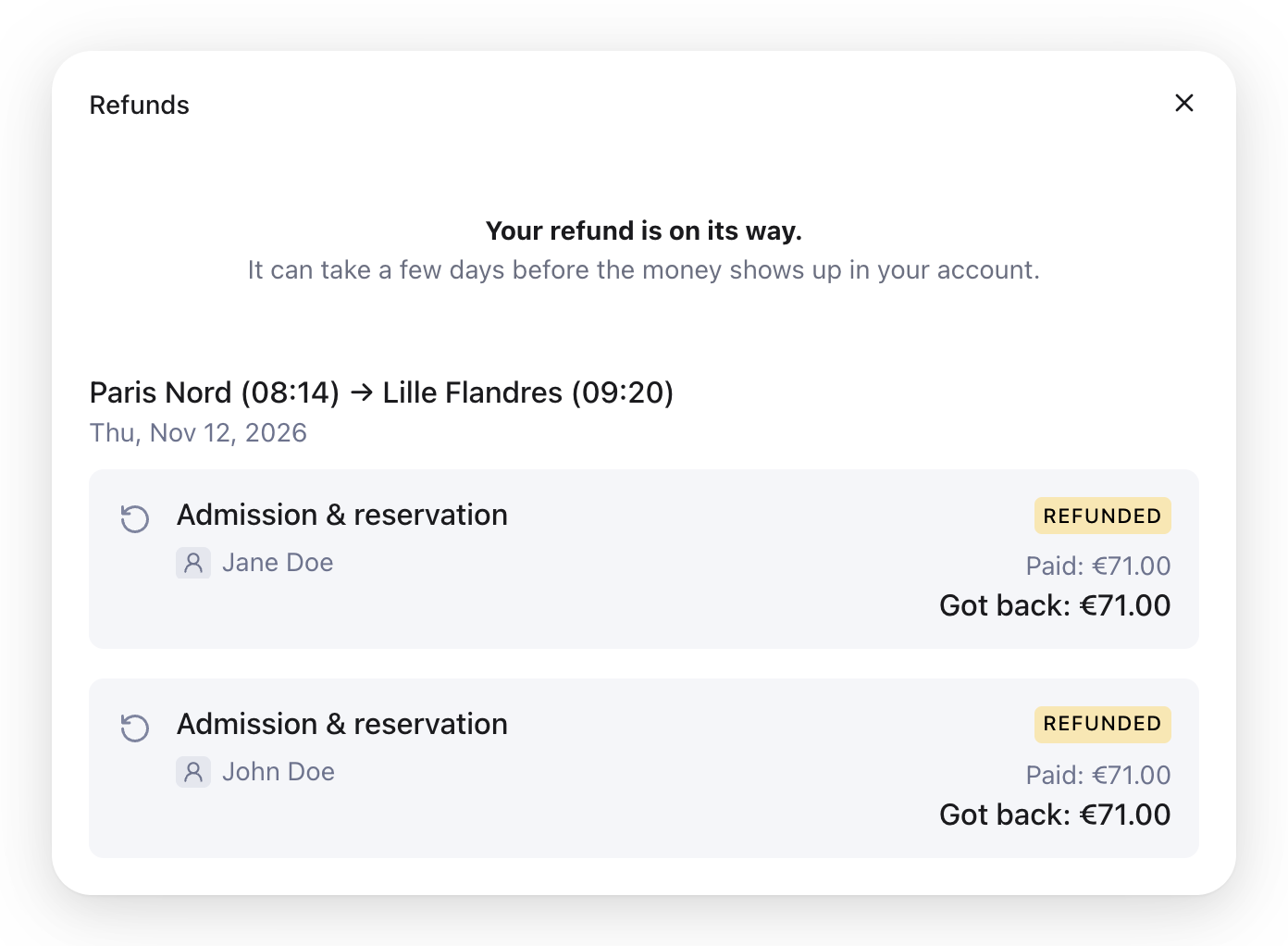
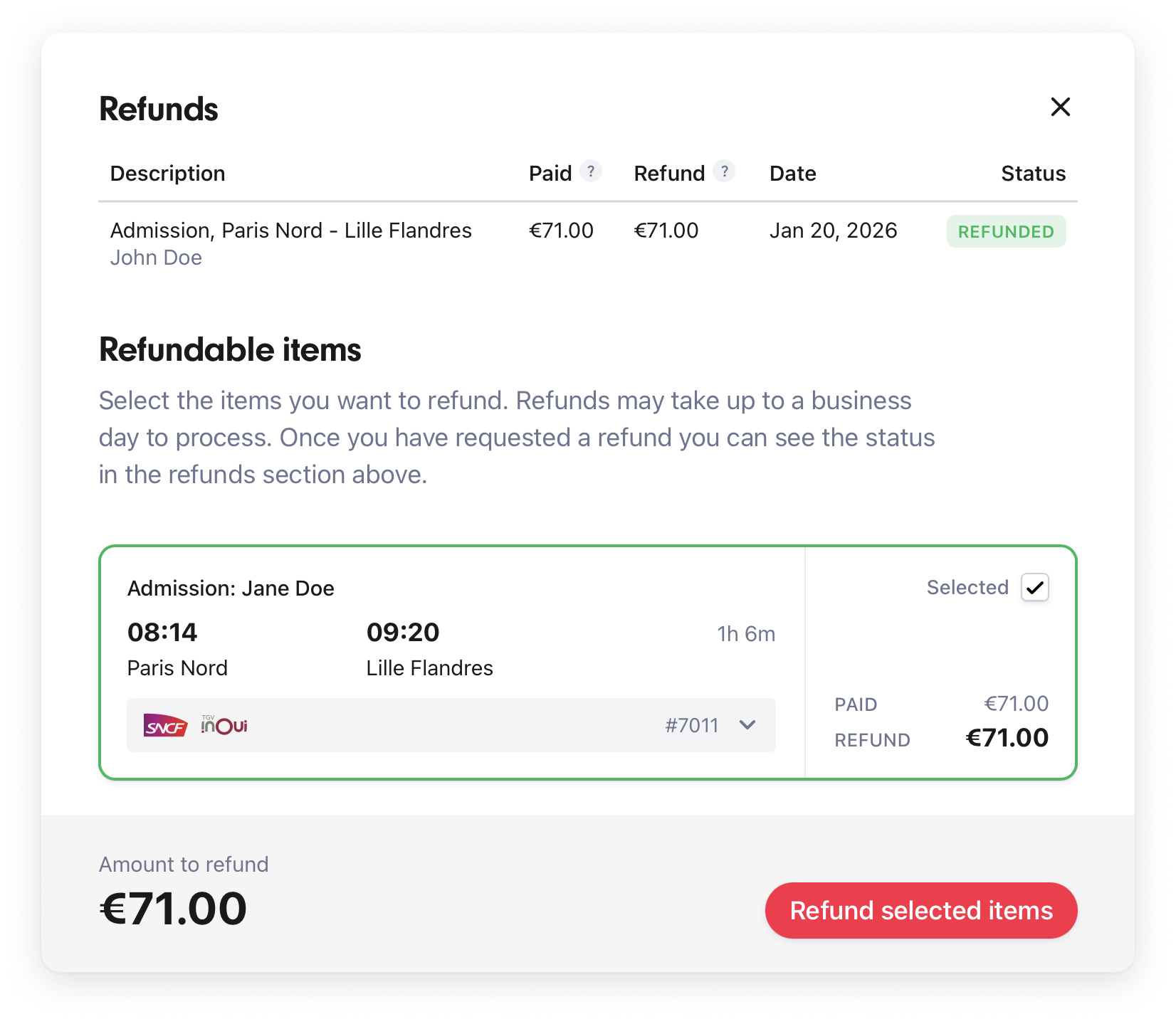
When opened, the embed displays a modal listing the order's items grouped by journey. Items that can still be refunded show what was paid and what the traveler gets back, and items that have already been refunded are marked with the status of their refund. The user can select one or more items and submit a refund request, with the embed handling all API communication automatically.
The Refund Manager is fully responsive and will adapt to the screen size of the user. Scroll down to see an example of the Refund Manager in action.
Getting Started
To add the Refund Manager to your website, you first need to load the script. The script is a standard JavaScript module and can be loaded using the script tag.
Loading the script as module
The type attribute needs to be set to module for the script to load properly.
html
<script
  src="https://allaboard.eu/embed/aa-refund-manager-modal.js"
type="module"></script><script
src="https://allaboard.eu/embed/aa-refund-manager-modal.js"
type="module"></script>The script will register the Custom Element aa-refund-manager-modal with the browser. The Custom Element can then be used in your HTML like any other HTML element.
To open the modal, you can either render the element with the open attribute or set it using JavaScript.
html
<aa-refund-manager-modal
  open
  publicApiKey="aat_your-access-token-here"
order="order_33m0f2c1q5w6s516n1f7n0j7q4"></aa-refund-manager-modal><aa-refund-manager-modal
open
publicApiKey="aat_your-access-token-here"
order="order_33m0f2c1q5w6s516n1f7n0j7q4"></aa-refund-manager-modal>html
<aa-refund-manager-modal
  id="my-refund-modal"
  publicApiKey="aat_your-access-token-here"
  order="order_33m0f2c1q5w6s516n1f7n0j7q4"></aa-refund-manager-modal>

<button type="button" id="button">Manage refunds</button>

<script>
const button = document.getElementById('button')
const modal = document.getElementById('my-refund-modal')
button.addEventListener('click', () => {
  modal.open = true
})
</script><aa-refund-manager-modal
id="my-refund-modal"
publicApiKey="aat_your-access-token-here"
order="order_33m0f2c1q5w6s516n1f7n0j7q4"></aa-refund-manager-modal>
<button type="button" id="button">Manage refunds</button>
<script>
const button = document.getElementById('button')
const modal = document.getElementById('my-refund-modal')
button.addEventListener('click', () => {
modal.open = true
})
</script>Credentials
This embed runs on public web pages, so whatever you pass as publicApiKey is visible to anyone who views the page. It works on an order that already exists: it reads that order's refund history and refundable items, and starts refunds on it. Any API key that can do that on one order can do it on every order on your sales agent, so no API key belongs in this attribute.
Pass an access token instead. Mint one on your server for the order the modal is opened on, with both capabilities, and render it into the page:
graphql
mutation CreateAccessToken {
  createAccessToken(
    restrictions: { orderId: "order_33m0f2c1q5w6s516n1f7n0j7q4" }
    capabilities: [READ, WRITE]
  ) {
    token
  }
}
mutation CreateAccessToken {
createAccessToken(
restrictions: { orderId: "order_33m0f2c1q5w6s516n1f7n0j7q4" }
capabilities: [READ, WRITE]
) {
token
}
}Mint a fresh token for each page render (the default lifetime is 15 minutes) and put the returned token in the embed's publicApiKey attribute. The attribute name is unchanged; only the value is. A token reaches the one order it was minted for, and only until it expires: a visitor who copies it out of the page can refund and pay for that order until then, and can do nothing at all to your other orders.
Never put an orders:read API key here
An API key carrying orders:read on a public page exposes every order on your sales agent to anyone who views it. Use an access token.
For which credential each embed takes, see Configuring embeds safely.
Cost Centers
Orders are billed against a cost center, which determines the payment method and commercial terms applied. See Cost Centers for details.
Attributes
The Refund Manager communicates with the All Aboard API to fetch refund history and refundable items for a given order. The <aa-refund-manager-modal> element can be configured by setting attributes on the element.
| Name | Description | Required |
|---|---|---|
publicApiKey | An access token minted for this order with the READ and WRITE capabilities. See Credentials above. | Yes |
order | The order ID to manage refunds for. | Yes |
open | Whether the refund manager modal is open. Set to true to display the modal. | No |
sessionId | The session ID to use when calling the API. Can be any unique string that identifies the session. Used for analytics and troubleshooting. | No |
language | The language to use for the modal. For example, en or sv. | No |
Events
To listen for events from the Refund Manager, you can use the addEventListener method. This is useful if you want to, e.g., update your UI when a refund is processed or handle errors.
| Name | Description |
|---|---|
aa-refund-manager-modal-refund | Emitted when a Refund is successfully processed. The event detail will contain the refund object. |
aa-refund-manager-modal-error | Emitted when an error occurs. The event detail will contain the error property which can be used to display an error message. |
aa-refund-manager-modal-close | Emitted when the modal is closed. Useful for updating the UI or cleaning up when the user dismisses the Refund Manager modal. |
Slots
Custom elements use slots to display custom markup inside the element.
error
You can use the error slot to display a custom error message when the modal fails to load.
html
<aa-refund-manager-modal
  publicApiKey="aat_your-access-token-here"
  order="order_33m0f2c1q5w6s516n1f7n0j7q4">
  <p slot="error">Oops, something went wrong.</p>
</aa-refund-manager-modal><aa-refund-manager-modal
publicApiKey="aat_your-access-token-here"
order="order_33m0f2c1q5w6s516n1f7n0j7q4">
<p slot="error">Oops, something went wrong.</p>
</aa-refund-manager-modal>success
You can use the success slot to show your own message once a refund has been requested. It is displayed above the list after a refund succeeds or is pending, and is not shown if the refund fails. The slot is rendered as you provide it, so style it to fit your site.
html
<aa-refund-manager-modal
  publicApiKey="aat_your-access-token-here"
  order="order_33m0f2c1q5w6s516n1f7n0j7q4">
  <div slot="success">
    <strong>Your refund is on its way.</strong>
    <p>It can take a few days before the money shows up in your account.</p>
  </div>
</aa-refund-manager-modal><aa-refund-manager-modal
publicApiKey="aat_your-access-token-here"
order="order_33m0f2c1q5w6s516n1f7n0j7q4">
<div slot="success">
<strong>Your refund is on its way.</strong>
<p>It can take a few days before the money shows up in your account.</p>
</div>
</aa-refund-manager-modal>Example
Selecting an item to refund, with an earlier refund on the same journey:
After the refund, with a message in the success slot: